

AllWebMenus Pro
Cross-browser support - Multiple menu effects, styles & themes
Powerful menu positioning options - Unicode support - HTML edit capabilities
Multiple rows/columns - Addins/Plugins - Extensions - SEO Friendly - Sitemap support


Save time
No Code - WYSIWYG
Rich UI - For All Browsers
Any Editor - Any CMS
How to use AllWebMenus with your Web Authoring tool
AllWebMenus has a simple way for adding your menus to your web pages.
The mechanism is broad enough to be applicable for a variety of Web Authoring tools, with minor adjustments for some tools only.
Step 1: Specify your "Site Root" folder in AllWebMenus
AllWebMenus needs to know where your website is locally stored, so that it compiles your menu files there.
Suppose that your website is under the C:\MyWebSite folder (locally).
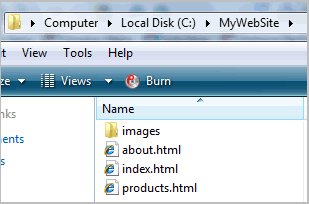
Open "Tools Project Properties", select "Folders", click the "Edit" link and choose C:\MyWebSite for your menu's "Site_Root folder".

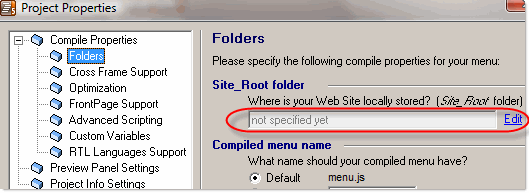
Note: If your tool does not use source HTML files prior to publishing (NetObjects Fusion for example), choose any folder on your hard drive (or create a new one) as "Site Root" folder. Your menu files will be compiled there and you will then add them to your website project through your tool's related commands.
Step 2: Compile your menu
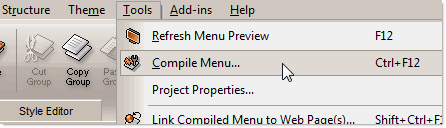
Click on "Tools Compile Menu" to compile your menu:
Once you compile, the necessary AllWebMenus files will be generated inside the C:\MyWebSite folder (or whatever folder your specified as "Site Root"):
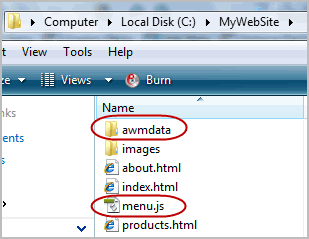
These files are:
- the awmdata folder (which contains the javascript libraries and images that power your menu)
- the menu.js file (or whatever name you specified as "Compiled menu name" in "Project Properties Folders")
Step 3: Link your menu to your web pages
In the "successful compile" form that appears after compile, select the button that allows you to link the menu to your web pages (you can also do this later through the "Link Menu" button).
This opens the following form, where you can select the web pages that you wish to contain your menu. You can select many pages at once and link to as many pages as you wish:
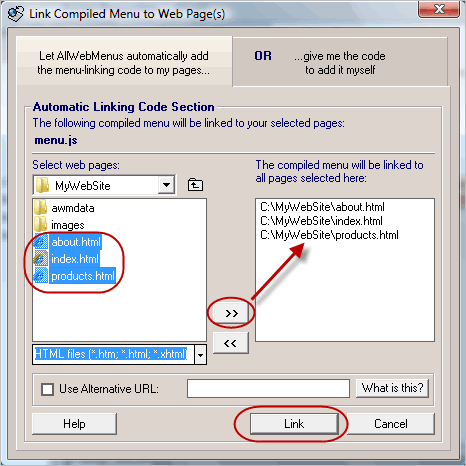
This process adds to your selected HTML files the necessary javascript code that builds your menu.
Note: If your tool does not use source HTML files prior to publishing (NetObjects Fusion for example), choose the option to add the menu-linking code yourself:
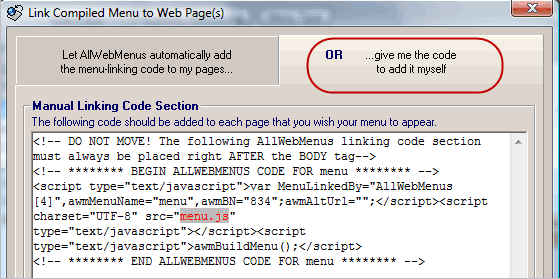
Note that "linking" the menu is not the same as "positioning" the menu.
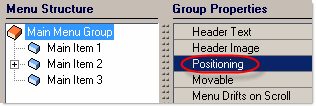
You can specify the method that positions your menu by selecting the <Positioning> property of the Main Menu Group:
Step 4: Publish (FTP) your updated web pages and your compiled menu files
Use your Web Authoring tool or your favorite FTP client to upload all the necessary files to your web server.
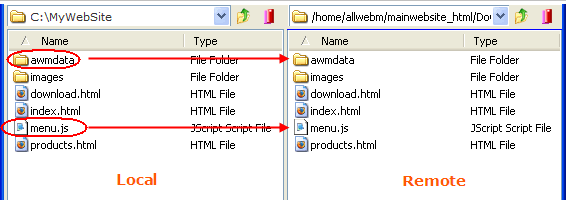
Remember that the AllWebMenus-related files should be uploaded at the exact same position as they are inside your local site structure (i.e. inside the C:\MyWebSite folder).
After uploading all necessary files, your remote site should appear as follows:
Enjoy your menus online!
AllWebMenus Pro
All Likno Products
 AllWebMenus
 Web Modal Windows Builder (jQuery)
 Web Tooltips
Builder (jQuery)
Web Tooltips
Builder (jQuery)
 Web Tabs Builder
(jQuery)
Web Tabs Builder
(jQuery)
 Web Accordion
Builder (jQuery)
Web Accordion
Builder (jQuery)
 Web Scroller
Builder (jQuery)
Web Scroller
Builder (jQuery)
 Web Button
Maker
Web Button
Maker
 Drop-Down
Menu Trees
Photo
Frame Show
Custom Project
Services
Drop-Down
Menu Trees
Photo
Frame Show
Custom Project
Services
Client Testimonials
"For over 5 years, the Likno Products have been ones of our most trusted web development tools. With excellent support and regular updates."

"Best menu creator tool out there! But best of all is their support! Friendly, knowledgeable, super to work with, and always keeping up with new technology. I wouldn't go anyplace else!"

"We are web developers and simply love your products. You do a superb job of updating them on a regular basis and they always work!"

Awarded as top software by several reviewers


Warning: Constant ABSPATH already defined in /usr/home/frames/public_html/likno/blog/wp-config.php on line 24
Fatal error: __autoload() is no longer supported, use spl_autoload_register() instead in /usr/home/frames/public_html/likno/blog/wp-includes/compat.php on line 502