

Likno Web Accordion Builder
User Interface for creating any type of jQuery accordion: vertical accordion, horizontal accordion, jquery accordion, jquery slider, accordion menu, collapsible panel, ajax accordion, javascript accordion, CSS accordion, accordion panel, etc.


Save time
No Code - WYSIWYG
Rich UI - For All Browsers
Any Editor - Any CMS
Drupal Accordion examples
Drupal Accordion/Likno Web Accordion Builder features
The Likno Web Accordion Drupal add-in & module combination has been developed to let you create stylish, feature-rich accordion controls for your sites! You can fully customize your accordions by adding your own non-drupal content with external or internal links, html-rich content, colors, borders, effects, designs of your choice and many more!
1. The Likno Web Accordion Builder Drupal Add-in
This already exists inside your Likno Web Accordion Builder installation (v2.0.200 or above only - no need to download and install separately), and can be accessed through the following menu:
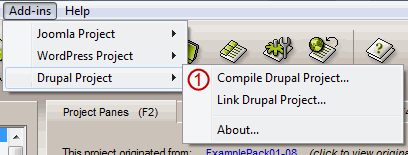
You can use the add-in to compile the accordion for use on your Drupal pages.
2. The Likno Web Accordion Drupal Module
This is the module that you need to install on your Drupal website.
Through the module you can upload the files of your accordion, choose whether or not an anchor element will be printed and finally choose the positioning method of it.
The Drupal module supports 2 accordion positioning methods:
- "Shortcode" method: This means that you can add this accordion inside the post or page that you want, using the drupal editor. Copy the code that the module produces (when has sortcode option selected) and place it inside the page/article you want.
The accordion will appear only on the single view of your page/article.
- "Block" method: A block of the selected accordion is initially created and found in the blocks administration page (should be at 'admin/structure/block'), under the "Disabled Blocks" section. Just drag this block instance and drop it inside the Block Area that you want.
Note 1: You should keep in mind that actual accordion positioning is handled by the Likno Web Accordion Builder application. For example if you create a '"Floating" over page'" accordion, which is set as "Relative to Window", no matter which "Positioning Method" you choose from the Likno Web Accordion Drupal Module the accordion will always appear relative to window.
Download and install the Likno Web Accordion Builder Module on Drupal
Step 1: Download the module's zip file
| Release Version: | 1.0.1 |
| License / Size: |
GNU/GPL 128 KB |
| Requirements: |
This "Module" version (i.e. code installed on Drupal) requires Likno Web Accordion Builder v2.0.200 or above in your PC (click [About] on its [Help] menu to view its version). Download the latest Likno Web Accordion Builder if not installed yet. The "Add-in" (i.e. code within Likno Web Accordion Builder) is already included with the installation (since v2.0.200, Jun. 2011), so no separate download link exists for install. |
Step 2: Install the module to your Drupal website
- Extract the file you downloaded in the previous step.
- Upload the entire likno_accordions folder (not just the files inside) to your modules directory in your Drupal site (ROOT/sites/all/modules/).
- Activate the module in your module administration panel (found at "Administer Site building").
Both Drupal 7 and 6
- Go to "Admin Modules Install New Module".
- Browse for the file you downloaded in the previous step and select it.
- Press the install button.
- Activate the module in your module administration panel (found at "Administer Site building").
- Activate the Likno Accordion filter in your content Text formats administration panel (found at "Administer Site Configuration Text formats select the format you use", make sure its called last).
New Install Option only for drupal 7
Configure and use the Module on Drupal
(for use with Likno Web Accordion Builder)
Step 1: Configure your accordion
While in Drupal:
- Login to the Admin area of your Drupal site.
- Go to the Likno Web Accordion module options.
- Configure accordion options of the accordion.
Switch to the Likno Web Accordion Builder desktop application:
- Step 1 - Configure your accordion (colors, borders, effects, styles, etc.) through the Likno Web Accordion desktop application.
- Step 2 - Choose how your accordion is "positioned" inside your Drupal posts/pages.
While in Likno Web Accordion Builder software, you will find the Positioning property at the bottom of the Project Panes tab.
There are 2 different options to position your accordion in your pages:
- "'Embedded' in page"
Select this option if you want the accordion to appear 'embedded' in your page. There are 3 sub-options: "Insert inside a page Element (div, span, td, etc)", "Replace a page Element", "Replace a page Image" (by using it's filename).
For the first 2 sub-options you can select from Likno Web Accordion Drupal module to print a page element (you can also choose not to print the page element but to provide Likno Web Accordion application with an already existing Element ID).
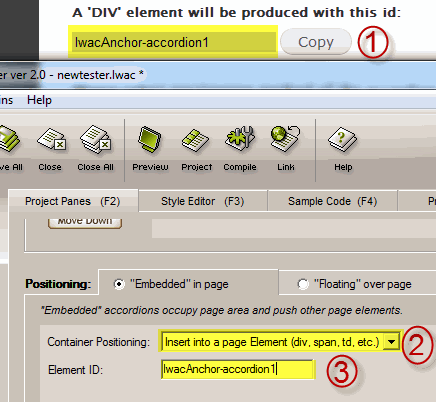 Copy the element id from the Drupal Plugin (item [1] on screenshot, if of course you want to print the element), select "Insert inside a page Element (div, span, td, etc)" or "Replace a page Element" as Container Positioning (item [2], and paste the previous copied id(item [1] on screenshot) inside the Element ID field (item [3] on screenshot).
- "'Floating' over page"
Select this option if you want the accordion to appear 'floating' over your page. Like the previous option there are also 3 sub-options available.
- First sub-option: "Relative to Window".
The accordion will appear("float") relative to window no matter which Likno Web Accordion Drupal Plugin positioning method you choose. Also if you choose this sub-option there is no need to print an anchor element (again regarding Likno Web Accordion Drupal Plugin).
- Second sub-option: "Relative to an Element"
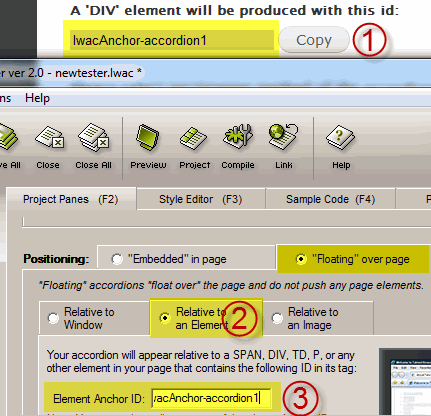
Copy the element id from the Drupal Plugin (item [1] on screenshot), select "Relative to an element" tab (item [2] on screenshot), and paste the previous copied id(item [1] on screenshot) inside the Element Anchor ID field (item [3] on screenshot).
- Third sub-option: "Relative to an Image"
The accordion will float relative to an image. There is no need to print an element if you choose this option.
- "'Embedded' in page"
View how positioning works through detailed examples/use cases
Step 2: Setup, Compile and Upload the accordion files
While in Likno Web Accordion Builder software:
- Compile the accordion using the "Add-ins Drupal Project Compile Drupal Project" (item [1] on screenshot).
Note: When asked for "Site_Root folder" use any local folder on your hard drive you like for the compiled files to be produced.
- Now you can upload the produced ZIP file using the 'Upload ZIP' file button at module settings.
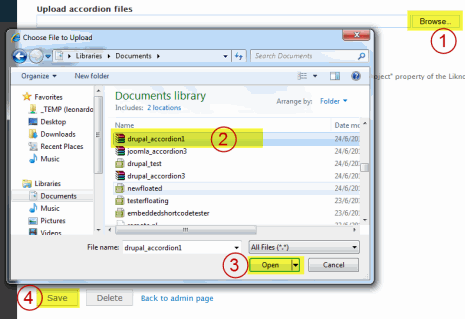
Select the accordion that matches the accordion you created with Likno Web Accordion Builder application. Using the "Upload accordion files" panel, browse to the location that the compiled accordion was produced(item [1] on screenshot), select it (item [2] on screenshot), press the "Browse button" (item [3] on screenshot) and upload the file by pressing Save button (item [4] on screenshot).
Note: The name of the accordion is again the one you selected in the options of the module (default is 'accordion'). You can change these options in the Tools Project Properties Folders in the Likno Web Accordion Builder application. It is strongly recommended not to edit the above properties, just leave them default.
Web Accordion Builder
All Likno Products
 AllWebMenus
 Web Modal Windows Builder (jQuery)
 Web Tooltips
Builder (jQuery)
Web Tooltips
Builder (jQuery)
 Web Tabs Builder
(jQuery)
Web Tabs Builder
(jQuery)
 Web Accordion
Builder (jQuery)
Web Accordion
Builder (jQuery)
 Web Scroller
Builder (jQuery)
Web Scroller
Builder (jQuery)
 Web Button
Maker
Web Button
Maker
 Drop-Down
Menu Trees
Photo
Frame Show
Custom Project
Services
Drop-Down
Menu Trees
Photo
Frame Show
Custom Project
Services
Client Testimonials
"For over 5 years, the Likno Products have been ones of our most trusted web development tools. With excellent support and regular updates."

"Best menu creator tool out there! But best of all is their support! Friendly, knowledgeable, super to work with, and always keeping up with new technology. I wouldn't go anyplace else!"

"We are web developers and simply love your products. You do a superb job of updating them on a regular basis and they always work!"

Awarded as top software by several reviewers


Warning: Constant ABSPATH already defined in /usr/home/frames/public_html/likno/blog/wp-config.php on line 24
Fatal error: __autoload() is no longer supported, use spl_autoload_register() instead in /usr/home/frames/public_html/likno/blog/wp-includes/compat.php on line 502