

AllWebMenus Pro
Cross-browser support - Multiple menu effects, styles & themes
Powerful menu positioning options - Unicode support - HTML edit capabilities
Multiple rows/columns - Addins/Plugins - Extensions - SEO Friendly - Sitemap support


Save time
No Code - WYSIWYG
Rich UI - For All Browsers
Any Editor - Any CMS
The AllWebMenus Web Tooltips Addin allows you to use stylish, feature-rich html tooltips (created with our jQuery-based Likno Web Tooltips Builder) on your javascript menus.
You can add these tooltips to menu items of your choice and replace the standard browser's tooltip on them:
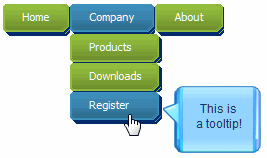
Visit the link below (with javascript tooltip examples) to experience a small sample of what the Likno Web Tooltips Builder product (separate license required) is capable of:
Through the rich interface of "Likno Web Tooltips Builder" you can:
- Create cross-browser jQuery tooltips to display micro-information when visitors mouse over on page elements of your choice (menu items for example) or even on page load!
- Use simple text, HTML code, images, videos or whole pages as the content of your tooltips, in static or dynamic form ("ajax tooltips").
- Create any type of jQuery tooltip, such as: html tooltip, ajax tooltip, balloon tooltip, javascript tooltip, css tooltip, dhtml tooltip, bubble tooltip, html image tooltip, etc.
- ...and more! View all features of Likno Web Tooltips Builder. Features
The AllWebMenus Add-in offers an easy integration between your menu and tooltips produced with that software, by enabling the <Tooltip Style> property on Items.
(In AllWebMenus)
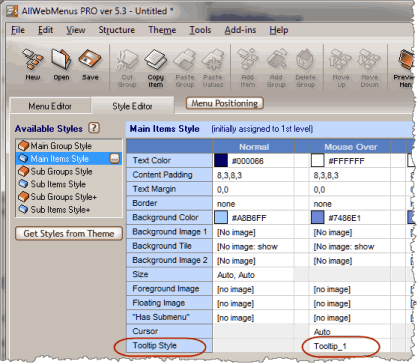
Provided that you compiled, uploaded and linked your tooltip project to your web page, you just need to edit the AllWebMenus <Tooltip Style> property with the name specified in Likno Web Tooltips Builder for your project:
(in Likno Web Tooltips Builder)
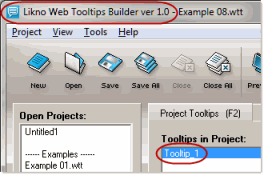
For detailed info on how to integrate the two products, please read the related Help topic in Likno Web Tooltips Builder.
Download/Version Info
The current Web Tooltips Add-in version is 1.0.1 and is pre-installed in AllWebMenus Build #810 or above.
If you have a version of AllWebMenus prior to Build #810, download the latest AllWebMenus version to have the latest Add-in version installed which adds the <Tooltip Style> property.
AllWebMenus PRO
Add-ins
See also...
FrontPage Addin Dreamweaver Extension NOF Component Other supported toolsClient Testimonials
"For over 5 years, the Likno Products have been ones of our most trusted web development tools. With excellent support and regular updates."

"Best menu creator tool out there! But best of all is their support! Friendly, knowledgeable, super to work with, and always keeping up with new technology. I wouldn't go anyplace else!"

"We are web developers and simply love your products. You do a superb job of updating them on a regular basis and they always work!"

Awarded as top software by several reviewers


Warning: Constant ABSPATH already defined in /usr/home/frames/public_html/likno/blog/wp-config.php on line 24
Fatal error: __autoload() is no longer supported, use spl_autoload_register() instead in /usr/home/frames/public_html/likno/blog/wp-includes/compat.php on line 502